
Your Bitrix24 REST API is the back door to your CRM, your tasks, your files and your customers. Anything that holds a working webhook URL can read and change that data, from any network, at any speed, forever, and you will not be told when it does. Most portals hand out that power without a second thought, because the standard way to connect a tool to Bitrix24 is to create an inbound webhook and paste the URL.
This guide shows how to protect the REST API properly and how to watch it afterwards. It uses OIA Shield24, a Bitrix24 Marketplace app that sits between callers and your portal, but the model applies to any setup: least privilege, a hard limit on speed, and a record of everything.
Short answer: Put a gateway between everything that calls your Bitrix24 REST API and the portal itself. Give every caller its own key, allow only the methods it needs, restrict it by IP address, cap its request rate, and read the logs. OIA Shield24 does all five from one screen inside Bitrix24.
Why the Bitrix24 REST API needs protection
A Bitrix24 inbound webhook is a URL with a secret inside it. It acts with the permissions of the user who created it, for the scopes you ticked when you created it, such as the whole crm scope. It does not expire on its own, and nothing in the URL tells you who is using it. That is convenient for a quick integration and risky as soon as the URL leaves your hands.
| Risk | What it looks like | The control that stops it |
|---|---|---|
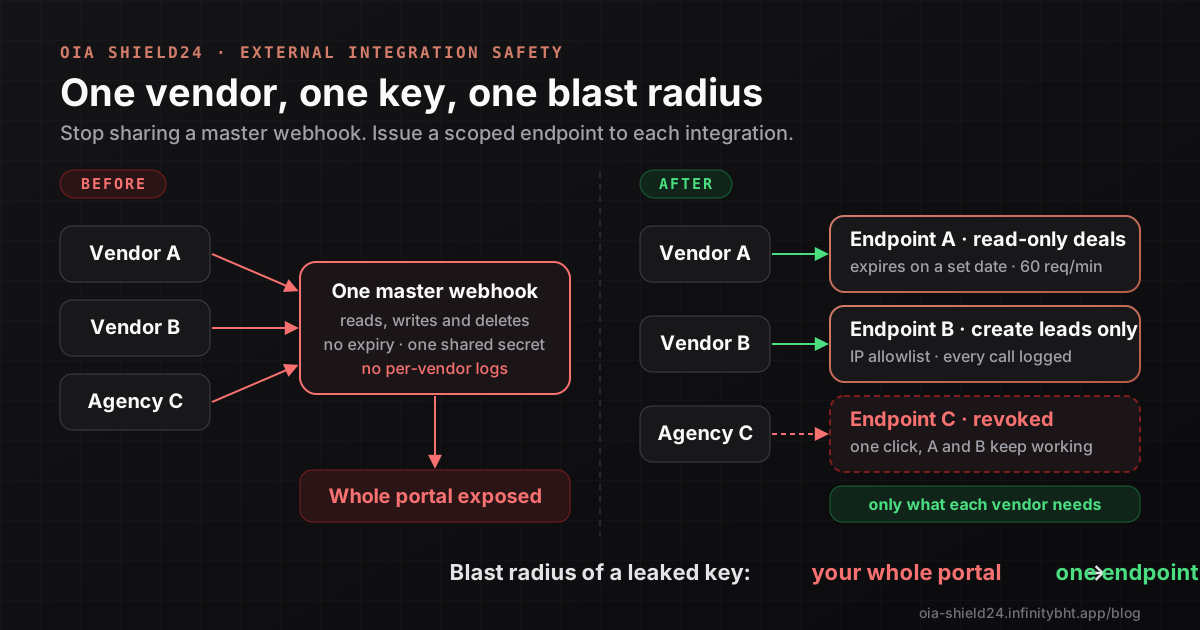
| Leaked webhook URL | Pasted in a ticket, a chat or a public repository, then used by a stranger | Per-caller keys that can be revoked in one click, plus IP allowlists |
| Over-privileged vendor | An agency that only needed to read deals can also delete them | Method allowlists and read-only operations |
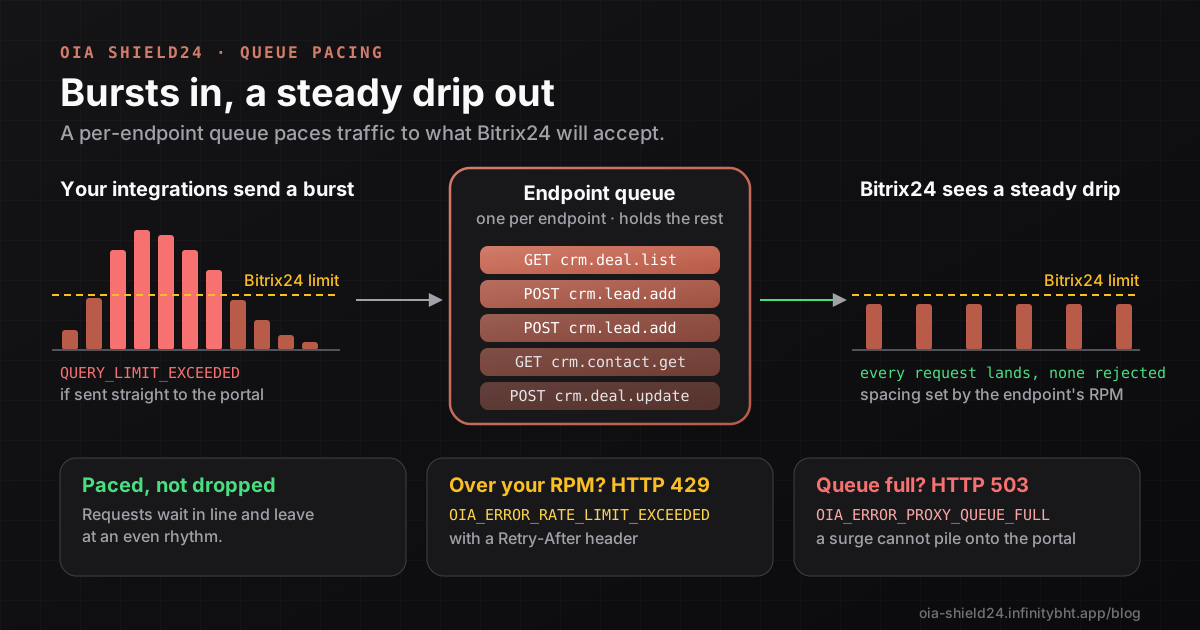
| Runaway script | A loop fires hundreds of calls per second and your portal starts returning limit errors | Per-endpoint rate limits and a request queue |
| Forgotten access | A freelancer finished a year ago and the webhook still works | Expiry dates on every endpoint |
| Unknown activity | Something is hitting the API, but nobody can say what or when | Request logs and threat signals |
The five layers of protection
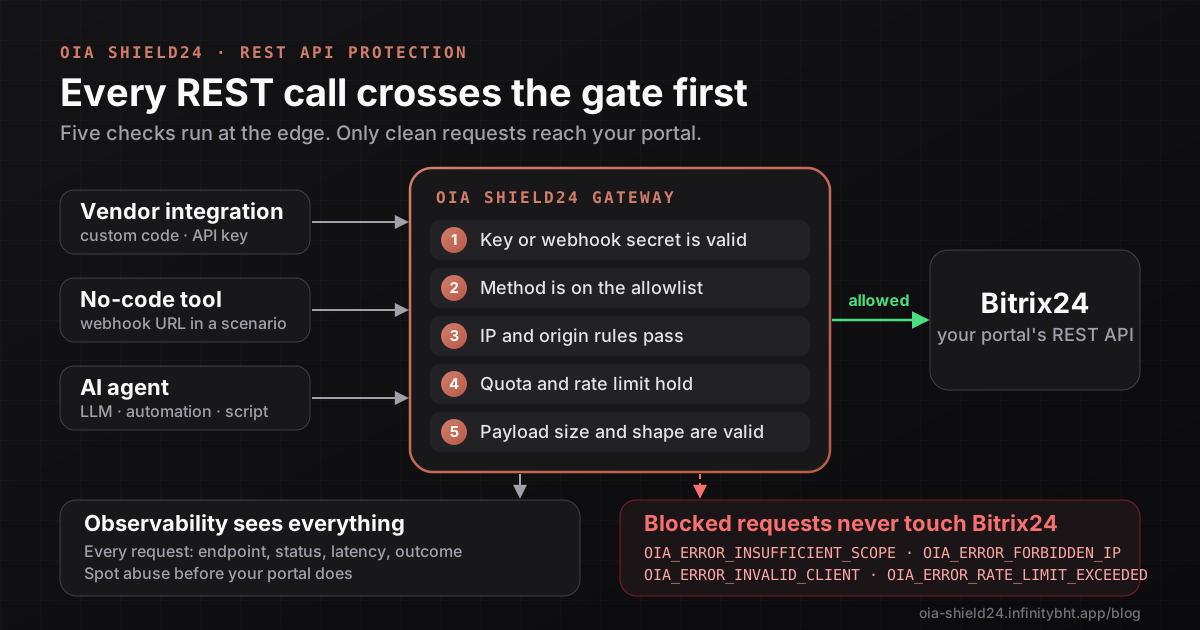
OIA Shield24 gives each vendor, tool or agent its own proxy endpoint. Every request to that endpoint passes the same five checks before it can touch Bitrix24:
- Identity. The key or webhook secret must be valid, active and not expired. Keys are hashed for lookup and encrypted at rest, and the Bitrix24 tokens behind them are encrypted too, so the caller never holds a real portal credential.
- Method allowlist. The Bitrix24 method must be on the endpoint's allowed list. A key that may call
crm.cannot calldeal. list crm., and some methods that would expose OIA Shield24's own credentials are never available to any vendor.deal. delete - Network rules. Optional IP allow and block lists, and an allowed-origins list for browser-based callers, so a leaked key is useless from the wrong network.
- Quota and rate. Your plan's request quota and the endpoint's own requests-per-minute limit are enforced before the call goes out.
- Payload checks. Size limits and a valid JSON shape. Parameters a vendor must never pass, such as access tokens or callback URLs, are refused outright.
Requests that pass are forwarded to Bitrix24 and the answer comes back unchanged, apart from two protections: Bitrix24 file links are swapped for short-lived gateway links, and fields that would reveal credentials are removed from the response. Vendors keep their existing code and swap one base URL for another.
Step by step: protect your first integration
You will need to be a Bitrix24 administrator for the portal.
- Install the app. Open OIA Shield24 on the Bitrix24 Marketplace and install it, then open it from the left menu.
- Open Access Control. In the app sidebar choose Access Control, the Vendor Access Management page. Select New Vendor.
- Name it and choose the mode. Give the endpoint a clear name such as
Acme CRM sync. Pick a vendor type (Developer, Integrator, Agency or External Platform). Choose API Key for custom code that can set anAuthorizationheader, or Webhook for tools that only accept a URL. - Apply least privilege. Under Allowed Scopes tick only the scopes the integration needs, then switch on only the Allowed Operations required (READ, CREATE, UPDATE, DELETE). The form recommends starting with READ only. For tight control switch on Advanced Method Filtering and list the exact methods. The Templates menu has presets such as listing deals or contacts.
- Add network rules and limits. Set an IP allow list if the caller has fixed addresses (this is a Developer and Enterprise plan feature), choose an expiry from Never, 1 hour, 24 hours, 7 days, 30 days or a custom date, and enter a requests-per-minute limit.
- Create the endpoint and copy the credential. The Endpoint Provisioned dialog shows the key, or the webhook base URL for you to copy. You can reveal it again later with the copy button on the endpoint's row, so keep it in your password manager.
- Test it. Make one allowed call and one that should be refused:
# Allowed: the endpoint may list deals
curl -s -X POST "https://oia-shield24.infinitybht.app/rest/crm.deal.list" \
  -H "Authorization: Bearer $SHIELD24_ENDPOINT_KEY" \
  -H "Content-Type: application/json" \
  -d '{"select": ["ID", "TITLE"]}'

# Refused: the same key may not delete
curl -s -X POST "https://oia-shield24.infinitybht.app/rest/crm.deal.delete" \
  -H "Authorization: Bearer $SHIELD24_ENDPOINT_KEY" \
  -H "Content-Type: application/json" \
  -d '{"id": 1}'
The second call returns an OIA_ error and never reaches Bitrix24. For a webhook-mode endpoint the URL has the form https:/.
How to monitor the REST API
Protection tells you what is stopped. Monitoring tells you what is happening. Open Observability in the app sidebar. The gateway explorer lists requests with their endpoint, status, latency and outcome, and you can filter by any of them. Each endpoint also has a Logging Compliance level that decides how much detail is kept: none, metadata only, errors only or full. Metadata only is a sensible default for production, because it records that a call happened without storing customer data.
These are the signals worth acting on:
| Signal in Observability | Usually means | What to do |
|---|---|---|
Rising OIA_ | Someone is guessing or replaying a revoked key | Check the source IPs, add an allow list, rotate the key |
OIA_ from a known vendor | The vendor's code calls a method you never approved | Ask why, then either widen the scope on purpose or fix their code |
OIA_ | A key is being used from outside its allowed network | Treat as a possible leak and rotate |
OIA_ | A script is too fast or stuck in a loop | Fix the caller or raise the limit deliberately |
| One endpoint with a high error rate | A broken integration or a failing upstream | Open the endpoint's requests and read the status codes |
On the Enterprise plan the Threat Intelligence panel does a first pass for you. It reads the last 24 hours of your own traffic and flags IP rule hits, rate-limit abuse, invalid-key attempts, endpoints with high error rates and suspicious IP addresses, each with a plain-language recommendation. It is rule-based, not machine learning, which means its findings are easy to explain to an auditor.
A 10-minute weekly routine
- Open Observability and look at the last seven days of errors by code.
- Investigate any endpoint with invalid-key or forbidden-IP errors.
- Check which endpoints are close to their expiry date and renew only the ones still needed.
- Revoke endpoints for vendors you no longer work with.
Frequently asked questions
Does a gateway change what Bitrix24 returns?
No. Responses pass through unchanged, except that Bitrix24 file links become short-lived gateway links and credential fields such as access tokens are removed. Vendors do not need to change their parsing code.
Do my vendors have to rewrite their integration?
No. They replace the base URL and send the new key. The method names, parameters and response shapes stay exactly as in the Bitrix24 REST API.
Can I protect a no-code tool that only accepts a webhook URL?
Yes. Choose Webhook mode when you create the endpoint. The URL carries an alias instead of your real Bitrix24 member ID, and the same method, IP and rate rules apply.
What should I do if a key leaks?
Revoke that endpoint from Access Control. Only that one caller loses access and every other integration keeps working. Create a new endpoint with a fresh key and, if you can, add an IP allow list to it.
Which plan do I need?
Keys, method scoping, rate limits and logs work on every plan, and the Free plan costs nothing. IP allow and block lists need the Developer plan or higher, and the Threat Intelligence panel is on Enterprise. See pricing and the system limits for the current figures.
If your next step is giving a vendor access, read how to onboard external integrations safely. If your concern is speed, read how queue pacing prevents rate-limit errors.
Put this into practice with OIA Shield24
Install OIA Shield24 from the Bitrix24 Marketplace, create your first scoped endpoint in a few minutes, and see every request in Observability. The Starter plan is free.